



Our current sensors normally report occupied track sections to an s88-N feedback module. But they can just as well be read directly with an Arduino – for example, to show in the fiddle yard which track is occupied, or to switch the polarity of a frog depending on it. This guide shows step by step how to connect the current sensor, which resistor is needed and which pitfalls are often overlooked.
Key points at a glance
- The current sensor’s DATA output switches to GND when occupied – the Arduino then reads LOW.
- Without a pull-up resistor, the input is undefined: the reading jumps back and forth randomly.
- The Arduino’s internal pull-up is often not enough. A proven solution is an external 100 kΩ pull-up from 5 V to the input.
- In the sketch:
LOW= occupied,HIGH= free.
Contents
What you need
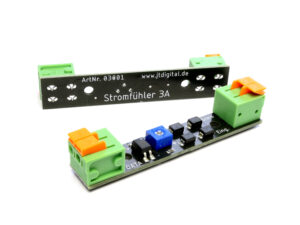
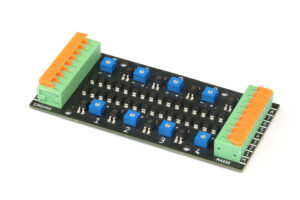
- an Current Sensor 1×3A per track section – or one Current Sensor 8×3A for up to eight sections
- an Arduino with 5 V, for example Uno or Nano
- a 100 kΩ resistor per monitored section
- a track section insulated on both sides
- some stranded wire or jumper wires
How the signal output works
The current sensor sits between the command station’s track output and the insulated track section. If current flows in the section – because a loco or a lit carriage is standing there – the current sensor connects its output DATA with GND. If the section is free, DATA stays open.
So the output itself supplies no voltage; it only “pulls” to ground. That is exactly why the Arduino needs a resistor that holds the input at 5 V in the idle state – the so-called pull-up.
Track occupied
- Current flows in the section
- DATA is connected to GND
- Arduino reads LOW (0)
Track free
- no current in the section
- DATA is open
- Pull-up pulls to 5 V: Arduino reads HIGH (1)
Step 1: Connect the current sensor
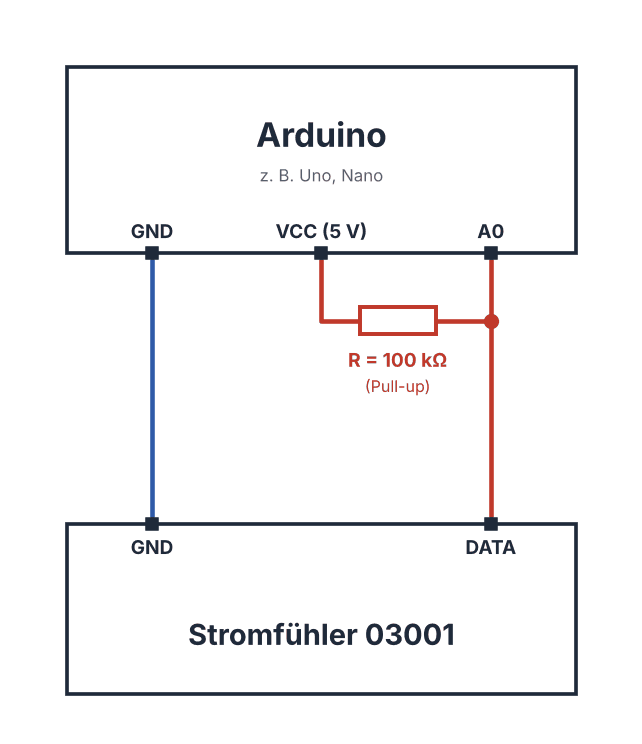
- GND of the current sensor to GND of the Arduino.
- DATA of the current sensor to an input of the Arduino, for example A0. The analogue pins can also be used as digital inputs.
- A resistor of 100 kΩ between 5 V and the same input.
- Track side as usual: track output of the command station or booster to “Input”, the insulated section to “Track” – details are in the installation instructions.
Several tracks: Each current sensor gets its own input (A0, A1, A2 …) and its own pull-up. GND is shared by all. On the 8x3A current sensor each of the eight outputs works in exactly the same way.
Why a large pull-up?
This is the most common sticking point. When the detector is triggered, its output has a certain internal resistance. Together with the pull-up it forms a voltage divider. Only if the pull-up is significantly larger than this internal resistance does the voltage at the input reliably drop below the Arduino’s switching threshold – and it reliably detects LOW.
The Arduino’s internal pull-up and also an external 10 kΩ resistor are usually too small for this. The typical symptom: when a loco enters the section, the value read seems to jump randomly between 0 and 1. With a pull-up of 100 kΩ the circuit works reliably.
Often overlooked: If you use an external pull-up, the internal pull-up must be off – that is, pinMode(A0, INPUT) instead of INPUT_PULLUP. Otherwise both resistors are connected in parallel and the effective value becomes too small again. And: no pull-down! With a resistor to GND, the Arduino always reads LOW.
Step 2: Upload the sketch
A minimal sketch for one track: the onboard LED lights up while the section is occupied, and the serial monitor shows the state.
// Occupancy detection with current sensor 03001 on the Arduino
const int GLEIS1 = A0;          // DATA output of the current sensor
const int LED    = LED_BUILTIN; // Onboard LED shows "occupied"

void setup() {
  pinMode(GLEIS1, INPUT);       // external 100 kΩ pull-up, internal pull-up OFF
  pinMode(LED, OUTPUT);
  Serial.begin(9600);
}

void loop() {
  // active-low: LOW means "track occupied"
  bool belegt = (digitalRead(GLEIS1) == LOW);

  digitalWrite(LED, belegt ? HIGH : LOW);
  Serial.println(belegt ? "Track 1: occupied" : "Track 1: free");
  delay(200);
}
Classic pitfall: In C/C++, == checks for equality, = assigns a value. if (gleis1 = false) is therefore always false – the correct form is if (gleis1 == false). The mistake is easy to miss because the sketch compiles anyway – the evaluation simply does not work.
Step 3: Test and find faults
Let a loco run into the section: the onboard LED must light up, and “Track 1: occupied” appears in the serial monitor. If that does not work straight away, check the most common causes in this order:
- Check the logic: Is LOW evaluated as “occupied”? The return value of
digitalRead()may need to be negated. - Increase the pull-up: Use 100 kΩ and switch off the internal pull-up.
- Measure the voltage: With a multimeter between input and GND – once with and once without a loco in the section. Without a loco there should be about 5 V, with a loco well below 1.5 V (switching threshold on the 5 V Arduino).
- Measure the detector: Measure the resistance between DATA and GND on the current sensor, again with and without a loco.
- Adjust the sensitivity: Use the potentiometer to shift the switching threshold. Towards “+” the detector becomes less sensitive, towards “−” more sensitive.
- Test another input: To rule out a faulty pin, use a different input.
Frequently asked questions
Can I connect the current sensor to an Arduino and an s88-N feedback module at the same time?
No, it is an either-or: a signal output is connected either to an s88-N feedback module or to an Arduino – not to both at once.
Does this also work with a 3.3 V board such as ESP32 or Raspberry Pi Pico?
Yes, the principle is the same: the output only switches to GND, and the pull-up then goes to 3.3 V instead of 5 V.
Why does the reading flicker when a train enters?
Usually the pull-up is too small or the internal pull-up is also active. If that does not help, you can briefly debounce the state in the sketch – for example, only accept it after several identical readings – or readjust the sensitivity with the potentiometer.
How much may I connect to the output?
The signal output tolerates up to 35 V DC and 50 mA. That is more than enough for an Arduino input with a pull-up; loads such as relays or lamps do not belong directly on the output.